Boutique Revenue Blitz Replay
Everything you need to scale smarter: cutting-edge tech, unparalleled sales, optimized systems, and The Boutique Hub Black Team in your corner.
Built for Every Level
No fluff. Just results.
Whether you’re newer, rebuilding, or scaling—this gives you the structure to drive traffic and convert it into sales.
THE PROOF IS IN THE RESULTS
Don't take our word for it. Look at these screen shots from Shopify Analytic reports of Boutique owners currently using this system. They are running their ads in house, they are perfecting their social media with one off tools, and they are optimizing their webpages on their own!!!
These aren’t outliers—this is what happens when you run a real system with support.

$194K in Sales From Facebook Alone!

97K Page Visitors From Organic Social
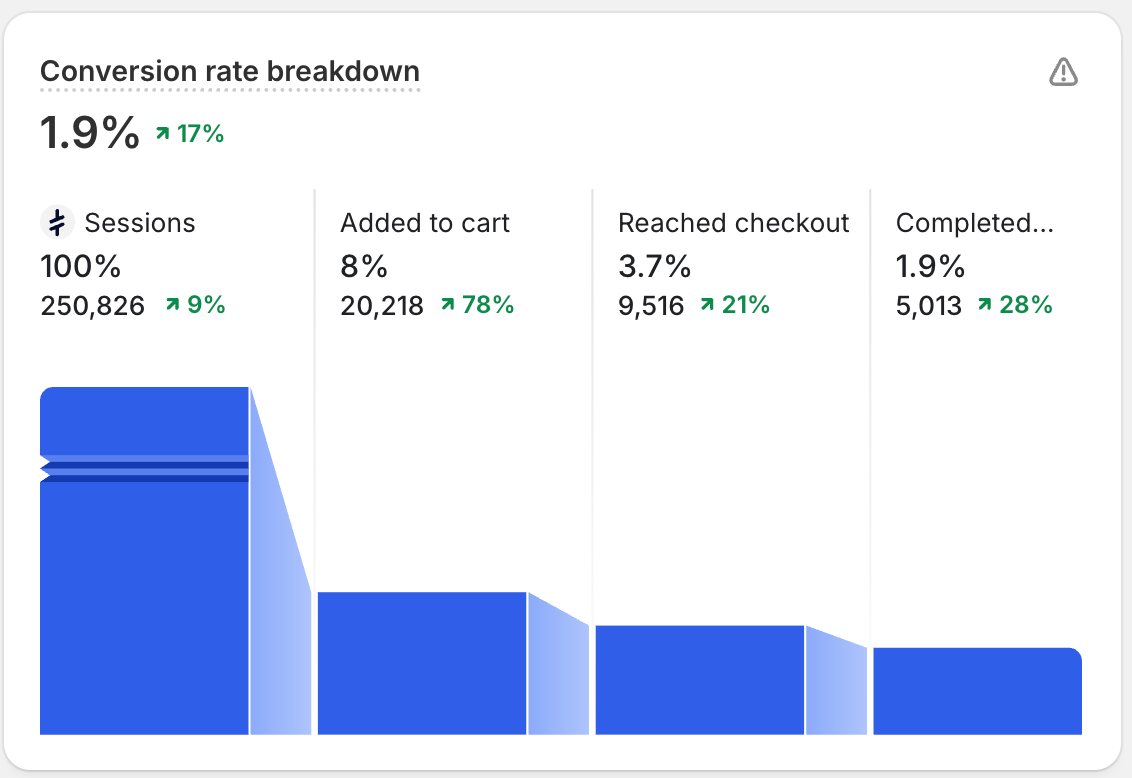
1.9% Conversion Rate On Page
Simple Inventory Liquidation Plan for Boutique Owners
Simple Inventory Liquidation Plan for Boutique Owners
- Days in inventory (90+ days is the danger zone)
- Low sell-through (sold less than 30% of units received)
- Broken size runs sitting too long
- Seasonal items that won’t sell at full price again
- Styles with limited size ranges left
- Trend-based items that missed their moment
- Best sellers that just need traffic
- Core basics you can restock
- New arrivals
If it hasn’t sold in 90–120 days, it goes into liquidation.
Step 2: Adjust Your Shopify Website (Liquidation Mode Without Killing Your Brand)You’re running a collection-focused clearance, not a sitewide sale.Homepage ChangesAdd ONE clear section (not a takeover):
- Headline: End of Season Clearance
- Subhead: Select styles up to 60% off – while sizes last
- Button: Shop Clearance
Step 3: Create a High-Converting Liquidation CollectionShopify → Products → Collections → Create CollectionCollection Setup
- Name: End of Season Clearance
- Collection Type: Manual
- Only add approved aged inventory items
Final markdown on select styles No restocks • Limited sizing remaining
- Size
- Price
- Availability (in stock only)
- Final Sizes
- Last Chance
Step 4: Update Product Pages (Only for Liquidation Items)Do not update every product page — only clearance items.Add a Small Badge or Line of Text
- Final Sale Item
- Last Chance Style
- Final Markdown – No Restocks
Step 5: Create a Simple Facebook Ad That WorksCampaign Setup
- Objective: Sales
- Destination: Clearance Collection Page
- Budget: Start with $10–$25 per day
- Website visitors (last 180 days)
- Engaged Facebook & Instagram users
- Email list (if available)
Simple Facebook Ad Copy ExampleHeadline: End of Season Clearance
Step 6: Evaluate EffectivenessReview results after 72 hours and again after 7 days.Metrics That Matter
- Revenue generated from clearance
- Units of inventory reduced
- Return on ad spend (ROAS)
- Conversion rate on the collection
- Inventory moving faster
- Cash flow freed up
- Warehouse space cleared
- No damage to full-price sales
Step 7: When to Stop or Scale
- ROAS above 1.5 → slowly increase budget
- Items sell out → remove immediately
- Conversion low → simplify the collection
If you want one-on-one help applying this liquidation strategy to your store — including:
- Selecting the right aged inventory to move quickly
- Structuring Shopify collections correctly
- Reviewing your website setup before sending traffic
- Making sure liquidation clears inventory without hurting your brand
Book a free discovery call with a Boutique Hub Black coach: https://go.theboutiquehub.com/boutique-hub-black